beaTunes News

Monday, September 11, 2017

beaTunes on High Sierra

macOS 10.13, also known as High Sierra, is going to be released very soon, which means it's time to talk about compatibility with beaTunes. An issue some beta users reported is a missing menu bar. In essence, just the application name, but none of the usual menu items are visible, which makes it impossible to work with beaTunes.

Should you encounter this issue, please try the following solution see note below.

  • Go it https://support.apple.com/kb/DL1572 and install the latest Java version distributed by Apple.
  • The package will install two items: An antique Java Virtual Machine (JVM) and the JavaVM.framework.
  • Unless you still use an application that uses Java 6 (beaTunes does not), you should remove the Java 6 VM right away, because of security issues.
  • But for beaTunes to work properly, you must keep the JavaVM.framework, which has no known security issues.

Please let me know, should you encounter any other High Sierra-related issues.

Thanks.

Update

The issue seems to have been resolved in the final version of macOS 10.13.

Update 2

Unfortunately, the issue still persists on systems with non-English locale. To get beaTunes to run properly

  1. Please switch your system's UI language to English (via System Preferences)
  2. Start beaTunes
  3. Switch back to whatever your regular UI language is
I apologize for this inconvenience and hope it's properly fixed soon.

Update 3

Apple has indirectly acknowledged it's an operating system bug. They are working on a fix.

Labels: , ,

Tuesday, June 13, 2017

Dealing with Analysis Errors

When analyzing tracks with beaTunes, every now and then, things don't go quite as expected. beaTunes 5 improved, how you can deal with such analysis failures. Whenever you see an error message in the Task Queue's message panel, you can right-click it to find some options. Often beaTunes will offer just a way to navigate to the problematic song. But in some cases real solutions are offered.

A good example is an iCloud song. As shown in the screenshot, beaTunes will offer to download it for you, as it cannot be analyzed while in the cloud (iCloud download only available on macOS).

Labels: , ,

Wednesday, June 1, 2016

Why Free OS Upgrades Suck

Here's how Apple reacted to my last OS X 10.10 bug report:

That's right:

No plans to update Yosemite.

But let me start from the beginning... and yes, this is a little bit of a rant, something I felt I needed to get off my chest.

I develop and sell a small music app for Windows and OS X. Software veterans know, maintenance is an integral and probably the largest part of the development process. Since the software runs on customer machines, it's essential that it sends home crash reports (after asking for consent) so that I am aware of those really nasty, hard to reproduce bugs. These crash reports can easily be grouped by OS version, app version and probably most importantly, offending frame. This lets me prioritize and decide, on which bug I should spend the most time. The bug that eventually led to Apple's response from above was identified this way (rdar://22948498). It's one of the most frequent causes for crashes of my app on OS X 10.10. And it will never be fixed.

Because my app is written in Java, most crashes (let's define a crash as an event that produces a crash log) are caused either by the Java Runtime Environment (JRE) or by the OS. Solving JRE problems is not easy, but doable: The JRE is open source, there is a public bug database and there are a bunch of mailing lists that let me talk to Oracle engineers and other involved parties. Plus, and now we're getting closer to the actual topic of this article, I can freely choose which version of the JRE to ship with my app. Heck, I can even patch it myself and ship a custom OpenJDK version, if I want to. Not that that is typically a great idea, but still...

Solving OS problems is much harder. Neither OS X nor Windows are open source, there is no official and open bug database (Open Radar is great, but not official), and I don't get to choose the OS version my customers use.

But, you may say, you can require users to use OS version X.Y.Z in your system requirements blurb.

Yes. Indeed, I can.

But remember what I wrote about maintenance being part of software development? De facto, system requirements only shield you from old OS versions. What happens, when the customer updates her or his system, because the new UI is so much prettier? Or, as illustrated by Apple's response, when the OS manufacturer decides that it is no longer fixing certain bugs in its "old" OS (released 7/2014!) and actively urges customers to update their systems?

Why can Apple afford not to fix its OS?

From Apple's point of view, 10.11 is the bugfix for 10.10. And it's free as in you-already-paid-extra-for-the-hardware. So users just need to install this free upgrade, no need for Apple to fix the 10.10 branch, and everything is fine. Or is it not?

It is not.

Twitter is full of people bemoaning the fact that Apple is semi-forcing OS upgrades upon them. And they suffer when essential applications don't (yet) run on the new OS version, the vendor decides not to support the new OS at all, or the app is old but paid-for and now requires a paid upgrade.

What does Apple do about this? It's almost comical. OS X moves known incompatible software into a separate folder. Out of sight, out of mind. Problem solved. Frankly, I have my doubts the mechanism works well for anything but software built for the wrong architecture—be it 32-bit or PowerPC. If you really want to know, whether some app runs under a certain OS version, you might want to check a site like roaringapps.com.

But let's be fair. I'm sure that Apple tries hard not to break compatibility. Unfortunately, trying is not enough. Users and app developers inevitably have to deal with software that simply does not work anymore. If this happened every five years or so, it wouldn't be a big deal. But Apple likes to release often, push innovations out the door, and throw away legacy code. A new OS version is presented almost every year. So we are facing this problem quite frequently.

How much does a free OS upgrade really cost?

To be clear: I'm not saying that short release cycles are necessarily bad—they have their advantages. But contrary to what Craig Federighi claimed in 2013, the yearly OS X upgrades are not free. A price needs to be paid for each new version. Either by app developers, who have to spend a lot of time on making sure that their apps still work, or by users, who loose perfectly good apps or have to pay for upgrades. And that's why I'm so annoyed that Apple won't fix that 10.10 bug mentioned above. The price for that bug is paid by us, because it only leaves us with the unfortunate choice between occasional app crashes and an OS upgrade with associated hidden costs.

Most likely, Apple will announce another free upgrade for OS X at this year's developer conference (WWDC).

Will you upgrade once it's released? How much will it cost you?

Labels: , , ,

Tuesday, May 12, 2015

BeatGauge: Automatic BPM detection for iTunes

BeatGauge Logo

I'm happy to announce, that beaTunes got a little brother today. His name is BeatGauge and he's a dead-simple, automatic BPM calculator. While beaTunes aims at the larger goal of improving metadata to build great playlists, BeatGauge does only one thing, but it does it very well:

It computes BPM values for your iTunes songs.

Simply drag your tracks from iTunes onto the app and it will automatically start calculating, reporting the results back to iTunes immediately. Honestly, I don't know how this could be done any simpler.
Under the hood, BeatGauge uses multithreaded GCD code, taking advantage of your computer's multiple cores. It's written in Swift for OS X 10.10 (Yosemite)—in other words: Apple's latest technologies.

As of today, BeatGauge is exclusively available via the Mac App Store (MAS). If you're using iTunes on Yosemite and are looking for a light-weight BPM calculator, BeatGauge is definitely a nice addition to your audio tool-belt. Give it a try!

Demo

Labels: , , , ,

Wednesday, March 4, 2015

Faster graphics, fewer crashes: Java 8u40 is finally out!

beaTunes4 logo

Yesterday, Oracle finally released Java 8 update 40. Usually, these updates are minor affairs, but this one is a bit special for me. Buried in the list of fixes, 8u40 addresses the single largest source of beaTunes crashes on OS X. And just because it is surprisingly unclear to what a crash constitutes—let's just say a beaTunes crash is an event during which beaTunes suddenly disappears, OS X offers to send a crash log, and beaTunes also offers to send logs the next time it's started.

After reporting the bug in early September 2014 it was first ignored by the Oracle bug report evaluation team, until a little digging and poking provided more information and suggestions for a fix. Eventually the bug was fixed in late October 2014, but because of the standard release process didn't make it into an official release until now.

Though this is the most important fix for me personally, 8u40 certainly has a couple more things to offer (complete list). Here are my favorites specifically for OS X:

Snapshot

It will take a little while until an official beaTunes release with this updated Java version is published. But if you want to try it out right now, you can use the current development snapshot for OS X.

Labels: , , , ,

Tuesday, September 9, 2014

Help: Fixed

beaTunes4 logo

beaTunes 4.0.7 is an maintenance release, tweaking a number of things, fixing other small things. The only slightly more interesting fix, is the re-organization of the English online help, i.e. the help that's available in the app itself via the Help menu. Apparently some people were unable to access it. This issue should now be fixed. If you still have trouble using help, please contact me.

As always, you can download the software from the download section of the website.

Most important changes in 4.0.7

  • Fixed NPE in MatchListDialog key rendering.
  • Fixed OS X Help.
  • Fixed clip of transition renderer.
  • Fixed playlist name editable after creation.
  • Fixed wrong song dragged from sorted matching songs.
  • Fixed move per drag in new playlist.
  • Added full text index rebuild to database repair.
  • Moved to japlscript 3.0.6.

Labels: , ,

Tuesday, February 25, 2014

App Nap—or why analysis might be extra slow on Mavericks

beaTunes3 logoAs most OS X users have upgraded to Mavericks by now, more and more people realize what App Nap does to applications running for a long time in the background: It puts them to sleep.

In other words, when you start an analysis batch in beaTunes and then go on to work with other programs in the foreground, OS X may decide to essentially halt analysis, while beaTunes is not the frontmost application. It does so to preserve battery life and give you the best possible performance for the app you are working with in the foreground. While these intentions are noble, they interfere with background analysis.

But not all is lost, Mr. Redford. Finder allows you to turn App Nap off for individual applications. To do so, simply select beaTunes3 in Finder, and open the Get Info dialog (see image above). In the dialog, find the box Prevent App Nap and check it. That's it.

In beaTunes 4, I will hopefully come up with a more elegant solution.

Labels: , ,

Thursday, September 12, 2013

Java 7 on OS X, Round 2

beaTunes2 logoBack in April I posted a Java 7 version for OS X, believing that it was about time for Java 7 to shine… Well, unfortunately I was proven wrong.

Back then version 1.7.0_21 was current. Recently Oracle release Java 1.7.0_40 and it seems to address a number of the issues that made Update 21 so bad: Files with Umlauts can now be opened, and the file open dialog can now be used to select directories as well. That's why today I again release a beaTunes version with a bundled JRE 7. If you are unsure what this means, please simply download the regular version. For those of you interested in Java 7, please give this a go. Subjectively it seems faster. What do you think?

You can get beaTunes for OS X with Java7 here: beaTunes-3-5-16-jre-osx.dmg

Please let me know, if you encounter any problems!

Labels: , ,

Monday, April 29, 2013

Creating Retina-capable Images with Apple's Java 6

beaTunes2 logoFor a while now, beaTunes supports Retina displays. It does this mostly through the NSImage hack. Any images loaded using Toolkit.getDefaultToolkit().getImage("NSImage://your_image_name_without_extension") that conform to the Apple @2x-naming scheme will be drawn in high resolution, if possible. Another trick to draw in high resolution is to apply an AffineTransform of (0.5, 0.5) to your Graphics2D object before drawing. But what do you do, when you cannot access the drawing code and your image is dynamically generated? For example a custom image for a JButton. Or something you loaded from the Internet. Then you somehow have to mimic what's happening when you are using the NSImage-hack. Unfortunately, Apple's JDK does not offer a public API for what it does. But the implementing classes are nevertheless accessible. So with a little bit of reflection magic, we can take advantage of the same mechanism.

Let's see... First we need to be able to figure out, what the current scale factor is. The scale factor is the factor between logical and physical pixels. Retina displays have a factor of 2.0f, regular displays have 1.0f. Luckily the factor is stored in a desktop property, so it's easily accessible:

private static final String APPLE_AWT_CONTENT_SCALE_FACTOR = "apple.awt.contentScaleFactor";

public static float getHiDPIScaleFactor() {
    final Float scaleFactor = (Float) Toolkit.getDefaultToolkit()
        .getDesktopProperty(APPLE_AWT_CONTENT_SCALE_FACTOR);
    return scaleFactor == null ? 1.0f : scaleFactor;
}

public static boolean useHiDPIScaling() {
    return getHiDPIScaleFactor() != 1f;
}

And now the real trickery (for brevity I skipped imports and proper error handling):

// Creates Retina version of the given image.
public static Image toHiDPIResolution(final Image image) {
    if (!useHiDPIScaling()) {
        return image;
    }

    Image hiDPICapableImage = image;
    try {
        final Class cImageClass = Class.forName("apple.awt.CImage");
        final Method getCreator = cImageClass.getDeclaredMethod("getCreator");
        getCreator.setAccessible(true);
        final Object creator = getCreator.invoke(null);
        final Image nativeImage = (Image)creator.getClass()
            .getMethod("createImage", Image.class).invoke(creator, image);

        final Method getNSImage = nativeImage.getClass()
            .getDeclaredMethod("getNSImage");
        getNSImage.setAccessible(true);
        final Object pointer = getNSImage.invoke(nativeImage);
        final float scaleFactor = getHiDPIScaleFactor();
        final int scaledWidth = (int) (image.getWidth(null) / scaleFactor);
        final int scaledHeight = (int) (image.getHeight(null) / scaleFactor);
        hiDPICapableImage = (BufferedImage)creator.getClass()
            .getMethod("createImageWithSize", Long.TYPE, Integer.TYPE, Integer.TYPE)
            .invoke(creator, pointer, scaledWidth, scaledHeight);

        // dereference first image, to avoid double release
        final Field fNSImage = nativeImage.getClass().getDeclaredField("fNSImage");
        fNSImage.setAccessible(true);
        fNSImage.setLong(nativeImage, 0L);
    } catch (Exception e) {
        // in real code - throw something!
        e.printStackTrace();
    }
    return hiDPICapableImage;
}

When called on a Retina capable Mac with Apple's Java 6 (no, it won't work on Java 7/8), this code generates an Image that will be drawn in high resolution without having to apply an AffineTransform on the graphics object. Naturally, logical pixel width and height are halved, i.e. a 200x200 pixel image becomes a 100x100 image, but on a Retina display all 200x200 pixel are still drawn.

Be warned: Since this hack relies on unpublished APIs, it may become unusable at any time due to changes in Apple's JVM.

Enjoy.

Labels: , ,

Tuesday, July 26, 2011

Sales & Lion Compatibility

beaTunes2 logoSince we're having the beaTunes for Windows sale (41% off) over at Bits Du Jour tomorrow (7/27/2011), I'd like to take the opportunity to remind the Mac folks, that the OS X version is still available at reduced price (22% off) over at MacUpdate Promo. Also, and this should be interesting to all those eager early adopters out there, so far I don't know of any OS X 10.7 Lion specific bugs in beaTunes 3.

Labels: , , ,

Thursday, October 21, 2010

Did Apple just kill Java (on 10.7)?

beaTunes2 logoAccording to the latest Java SDK release notes:

As of the release of Java for Mac OS X 10.6 Update 3, the version of Java that is ported by Apple, and that ships with Mac OS X, is deprecated.

This means that the Apple-produced runtime will not be maintained at the same level, and may be removed from future versions of Mac OS X. The Java runtime shipping in Mac OS X 10.6 Snow Leopard, and Mac OS X 10.5 Leopard, will continue to be supported and maintained through the standard support cycles of those products.

beaTunes is written in Java.

After initially being very enthusiastic about Java, Apple over years reduced support more and more and apparently is now going to kill it (in a couple of years).

Labels: ,

Friday, January 15, 2010

Problems with sample rates other than 44.1kHz on OS X

beaTunes2 logoOn OS X, beaTunes 2.1 seems to have a problem with audio files not sampled at the standard 44.1kHz. I believe, I have found a workaround, but it's not quite ready to be posted as update. But I would appreciate it, if people who actually encounter this problem, gave this dev-snapshot a shot and provided some feedback. Thanks!

Labels: ,

Saturday, February 21, 2009

Creating your own Song Context Components

beaTunes2 logo

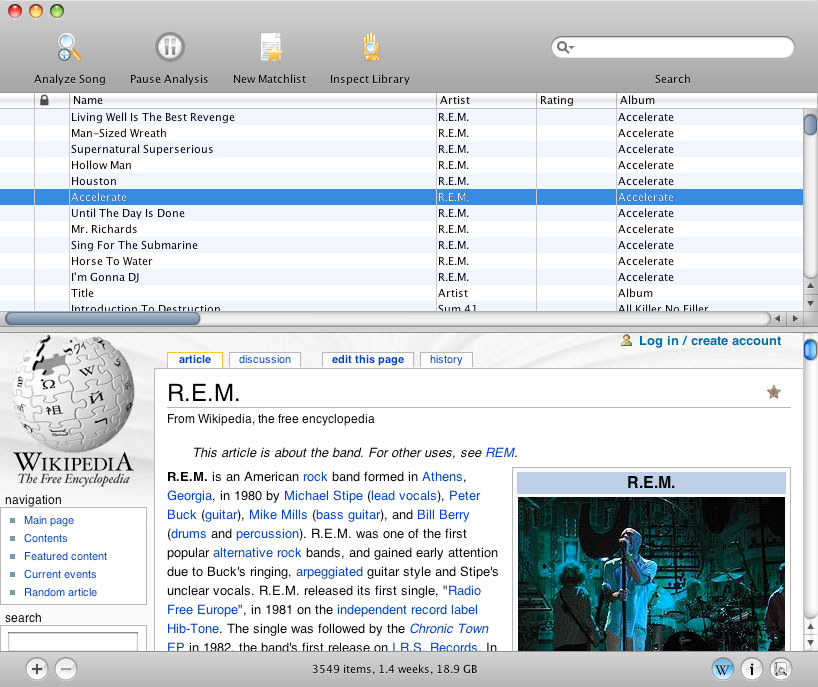
As a beaTunes user you know that the matching song table and the Amazon song info panel are integral parts of the application. Both are hosted in the same space, right below the main song table. beaTunes' new plugin API makes it simple to write additional, custom components for the same space. I'd like to show you with a simple example how it's done.

The idea of this plugin is to show the Wikipedia page corresponding to the selected song's artist. Because Java's JEditorPane has a rather poor HTML rendering performance and JWebPane is definitely not available on the Mac, we will use JDIC as browser component (this example will only run on OS X, the concept is the same though for Windows). Note, that the Mac version of JDIC is rather old and really only an alpha version. So expect unnecessary repaints and other visual artifacts. But this is not about the perfect embedded browser for Java, it's about custom SongContextComponents.

Subclassing SongContextComponent

Our Wikipedia component has to subclass com.tagtraum.beatunes.songtable.SongContextComponent. This superclass does most of the work for us. We only have to implement a couple of methods. Let's start with the simple stuff. Just like any other well behaved plugin, our component should have an id.

public String getId() {
return "songcontextcomponent.wikipedia";
}

Furthermore, it needs to specify a status label text, which for our purposes may always remain empty (future versions of the API won't require this anymore).

public String getStatusLabel() {
return null;
}

Setting up the UI

To set up the component itself, we have to declare a couple of fields and instantiate the UI component in the constructor. Also, as part of the interface, we have to implement the getComponent() method, which returns the JComponent that is going to be integrated into beaTunes' UI. Here's how it's done:

private static final Logger LOG = LogManager.getLogger(Wikipedia.class);

// the component we hand to beaTunes
private JPanel component;
// the actual browser component
private IWebBrowser webBrowser;
// we want to remember the last artist we've shown
// to avoid reloading the same page
private String lastArtist;
// page loading should be done in a separate thread, not the event thread
private ExecutorService executorService;
// loading will be done in a Future, which can be cancelled
private Future future;


public Wikipedia(final BeaTunes beaTunes) {
super(beaTunes);
// register the show hide action for this SongContextComponent
setShowHideActionId("wikipedia.show.hide");
this.executorService = Executors.newSingleThreadExecutor(
PriorityThreadFactory.getInstance(Thread.MIN_PRIORITY));
this.webBrowser = BrowserEngineManager.instance().getActiveEngine().getWebBrowser();
// webBrowser already has scrollbars, therefore a JPanel is good enough as component
this.component = new JPanel(new BorderLayout());
this.component.add((Component) webBrowser, BorderLayout.CENTER);
}

public JComponent getComponent() {
return component;
}

Reacting to song selections

Now that we have set up the webBrowser component, the only thing that's left to do, is to put some content into the browser window. To do so, we implement the update(Song) method. This method is called when the user selects a song in the main song table. To be precise, it is not called right away when the user selects a song, but with a little delay. This allows us to ignore the selection, should the user just scroll down a list of songs using the cursor keys.

public void update(final Song song) {
// sanity checks
if (song == null) return;
if (song.getArtist() == null || song.getArtist().length() == 0) return;
final String artist = song.getAlbumArtist() != null
&& song.getAlbumArtist().length() != 0
? song.getAlbumArtist() : song.getArtist();
// is this what we just showed?
if (artist.equals(lastArtist)) return;
lastArtist = artist;
showArtist(artist);
}

private void showArtist(final String artist) {
if (future != null) {
future.cancel(true);
}
future = executorService.submit(new Runnable() {
public void run() {
try {
// respect the user's language
final String language = getApplication().getLocale().getLanguage();
final URL url = new URL("http://" + language
+ ".wikipedia.org/wiki/Special:Search?search="
+ URLEncoder.encode(artist, "UTF-8") + "&go=Go");
webBrowser.setURL(url);
} catch (IOException e) {
LOG.error("Unable to open page for " + artist, e);
}
}
});
}

That's basically it.

Showing some Action

Well, almost... there are some things we still need to take care of. To start with, we of course have to provide a plugin.xml file to register the class. But more importantly, we have to provide some Action to show and hide our Wikipedia component. To do so, we subclass com.tagtraum.beatunes.action.standard.SongContextComponentShowHideAction. Here's the class:

public class ShowHideWikipediaAction extends SongContextComponentShowHideAction {

public ShowHideWikipediaAction(final BeaTunes beaTunes) {
super(beaTunes);
putValue(Action.ACCELERATOR_KEY, KeyStroke.getKeyStroke(KeyEvent.VK_W,
Toolkit.getDefaultToolkit().getMenuShortcutKeyMask()
| InputEvent.SHIFT_MASK));
}

public void init() {
// always call super.init() to make sure the action gets enabled/disabled properly
super.init();
putValue(Action.NAME, "Show Artist Info");
putValue(Action.SHORT_DESCRIPTION, "Shows artist info on Wikipedia");
putValue(Action.SMALL_ICON,
new ImageIcon(Wikipedia.class.getResource("wikipedia.png")));
putValue(BaseAction.SELECTED_ICON,
new ImageIcon(Wikipedia.class.getResource("wikipedia_selected.png")));
putValue(BaseAction.DISABLED_ICON,
new ImageIcon(Wikipedia.class.getResource("wikipedia_disabled.png")));
putValue(BaseAction.DISABLED_SELECTED_ICON,
new ImageIcon(Wikipedia.class.getResource("wikipedia_disabled.png")));
}

public String getId() {
// this is the id we reference in the Wikipedia class
return "wikipedia.show.hide";
}

public ActionLocation[] getActionLocations() {
return new ActionLocation[] {
// add to Edit menu
new RelativeActionLocation(BeaTunesUIRegion.EDIT_MENU,
RelativeActionLocation.RelativePosition.BEFORE, "tree.show.hide"),
// add as first (index 0) item to the lower right button panel
new AbsoluteActionLocation(BeaTunesUIRegion.LOWER_RIGHT_BUTTON_PANEL, 0)
};
}
}

And here is the very simple plugin.xml that needs to be placed in the META-INF directory of our jar.

<?xml version="1.0" encoding="UTF-8" ?>
<!-- Contains a list of plugins to be instantiated by beaTunes -->
<plugins>
<!-- SongContextComponent -->
<plugin class="com.beatunes.wikipedia.Wikipedia"/>
<!-- Actions -->
<plugin class="com.beatunes.wikipedia.ShowHideWikipediaAction"/>
</plugins>

Zip it!

Since the plugin uses third party libraries, we can't just put everything in one jar and place it in the plugin folder. Instead, we have to create a folder with a subfolder called lib. Into the lib folder we place the plugin's jar, jdic.jar and the native library libjdic.jnilib (both from JDIC). Then we zip the whole thing up.

In essence, the directory structure looks like this:

/lib/wikipedia-1.0.0.jar
/jdic.jar
/libjdic.jnilib

For beaTunes 2, the plugin classloader is configured to add all jars in the lib directory, and the classes subdirectory itself, should it exist. Note that plugins are not isolated from each other or from beaTunes, so library and/or class version conflicts are something to stay aware of.

You can download the full source for this example from here and the ready to go binary from here.

Labels: , , , ,

Saturday, May 24, 2008

UnsatisfiedLinkError: beaTunes, Leopard and Java 6

beaTunes LogoA little while ago, Apple finally released Java 6 for Leopard. Unfortunately, the 64bit Java 6 does not support QuickTime for Java anymore. Why? QuickTime for Java depends on Carbon, for which Apple is dropping support in 64bit environments.

What does this mean for beaTunes? In the long term we will move away from the QuickTime for Java API on OS X. We already utilize CoreAudio in parts of the application, which will not be affected by Apple's discontinued support for Carbon based APIs. We will replace the remaining code that is still using QuickTime.

Are users affected by this right now? Yes, unfortunately they are. As beaTunes works quite nicely with Java 6 on Windows, the current OS X version of beaTunes (1.2.9) will also start with Java 6, if it is installed. And this will fail due to the reasons mentioned above with an UnsatisfiedLinkError. To fix this, one needs to edit the file Contents/Info.plist in the beaTunes application bundle and replace the existing JVMVersion string with the value 1.5* (instead of 1.5+)

We will release an update next week, which contains this fix.

Labels: , , ,

Friday, November 16, 2007

OS X 10.4.11 solves iTunes Plus-CoreAudio problems

beaTunes LogoIt looks like the recent OS X 10.4.11 update solved a couple of issues with opening iTunes Plus files with CoreAudio. Previously, CoreAudio APIs were often not able to even open an iTunes Plus file even though no DRM was employed. For beaTunes users this was pretty annoying, since they had to fall back to a not as fast QuickTime implementation of the same code, that had to be manually enabled.

Labels: , , , ,